Enterprise-Grade Data Protection for Microsoft 365

Ensure your mission-critical data is always safe, accessible, and in your control
Customer Use Case

Challenge

Microsoft 365 is a prime target for cyberattacks and insider threats, often causing serious operational disruptions without access to emails, content, and collaboration. Organizations need a secure and reliable way to protect and recover their critical Microsoft 365 data.

Solution

A Microsoft 365 backup and recovery solution with unmatched flexibility, control, performance, and security, allowing customers to automate backups, store data in their preferred location, and recover exactly what they need, when they need it—within just a few clicks.
Business Value

Only control, no complexity

Image
HYCU-icon-001.svg

Minimize operational downtime

Never worry about accidental deletions, cyberattacks, or insider threats again. Restore or export Microsoft 365 data within minutes to keep your business running without interruption.
Image
HYCU-icon-002.svg

Keep your data under your control

Store Microsoft 365 backups in a storage target owned, accessed, and controlled only by you—always ready for safe recovery with true immutability.
Image
HYCU-icon-003.svg

Improve your compliance posture

Decide where your data resides, how often it’s backed up, and how long it’s retained. Meet your Microsoft 365 retention, residency, and governance requirements with ease.
Image
HYCU-icon-004.svg

Optimize your storage needs

Minimize your Microsoft 365 storage needs by leveraging the option to use Dell PowerProtect Data Domain Virtual Edition (DDVE) to achieve industry-leading data deduplication and compression.
Image
HYCU-icon-005.svg

Zero backup infrastructure management

No agents or complex Microsoft 365 backup infrastructure management. A SaaS experience that lets you monitor and manage your backups without spending more than 5 minutes a week.
Image
HYCU-icon-006.svg

Simplify backup management

Manage backup and recovery for 80+ workloads across on-prem, hybrid cloud, and SaaS apps from a single pane of glass. Consolidate and simplify your backup management with HYCU.
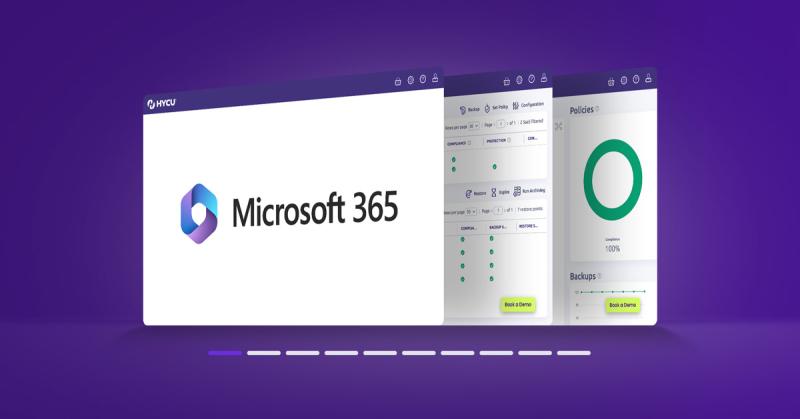
Product Tour

See for yourself

Key Features & Benefits

Minimize downtime and maximize productivity with HYCU

  • Bring your own storage (BYOS)

    Choose exactly where your backups live, including Amazon S3, Azure Blob Storage, Google Cloud Storage, Dell DDVE, or other S3-compatible options. Stay in control and meet your governance and residency needs.

    Image
    byos screenshot
  • Safe, ransomware-proof copies

    Recover your Microsoft 365 data confidently with truly immutable ransomware-proof copies stored off-site and locked using Object Lock.

    Image
    ransomware-proof-screenshot.png
  • One-click granular recovery

    Find and restore exactly what you need, in one click – whether they’re individual emails and files or an entire site.

    Image
    granular-recovery-screenshot.png
  • Unmatched storage efficiency

    Cut storage costs with industry-leading deduplication and compression—powered by synthetic backups, Dell DD Boost, and Dell DDVE working together.

    Image
    storage-efficiency-screenshot.png
  • Legal and compliance ready

    Meet your legal and regulatory requirements with built-in tools like audit logs, retention policies, legal hold, and eDiscovery.

    Image
    Legal-and-compliance.png
FAQ

Common Questions About Backup & Recovery for Microsoft 365

How long can I retain my Microsoft 365 backups with HYCU?

By default, HYCU offers unlimited backup retention for Microsoft 365 data. However, you also have the flexibility to set customizable options for finite retention periods if needed.

Which Microsoft 365 applications does HYCU protect?

HYCU provides comprehensive protection for Microsoft 365, including emails, SharePoint, OneDrive, OneNote, Groups, and Teams. This ensures your entire M365 environment is protected from data corruption, malicious deletion, and malware/ransomware attacks.

How does HYCU ensure the security of Microsoft 365 backups?

HYCU employs end-to-end encryption, supporting in-transit and at-rest encryption using TLS 1.2, AES256, and FIPS-2 certified Amazon KMS. The solution is compliant with several standards including HIPAA, GDPR, PDPA (Singapore), and Australia Privacy Act. Furthermore, the backup target used by HYCU is compliant with SOC 1, 2, and 3, ISO27001, FedRAMP, FISMA, and other security standards.

Can I recover individual files or folders from SharePoint and OneDrive backups?

Yes, HYCU allows for granular recovery of files and folders from OneDrive and SharePoint backups. You can perform both granular (files and folders) and full recovery of OneDrive files, SharePoint sites, Groups, and Teams data.

What eDiscovery and compliance features does HYCU offer for Microsoft 365?

HYCU provides detailed monitoring with audit trails for email backups, searches, downloads, and deletions, complete with alerts and notifications. It also offers legal and compliance hold features to suspend email expiration on demand. Additionally, HYCU enables eDiscovery across the board, allowing you to track email correspondence and analytics between senders and recipients.

How does HYCU handle email backup and recovery for Microsoft 365?

HYCU offers aggressive RPOs (Recovery Point Objectives) for M365 with constant journaling of emails, adhering to Microsoft best practices. For recovery, HYCU provides granular email recovery options, allowing you to recover individual emails, attachments, contacts, calendars, and tasks.

  • "Backing up M365 workloads and Azure VMs has become really easy using a familiar HYCU interface, without the hassle of managing a backup platform."

  • "HYCU The Best Backup software in the Cloud and M365."

  • "Truly happy with HYCU as our go to backup solution, we use it for both Microsoft 365 and Nutanix."

  • "We previously used Microsoft Backup, and now with HYCU I can backup my data without interruption and clone it to my WORM data center."

  • "Backup retention for M365 is unlimited, for SaaS products it depends on your personal storage, but is very flexible."

Free Trial

Start protecting your Microsoft 365 data for free‍

Image
R-Cloud Free Trial Form image

Backup Microsoft 365 data in minutes

  • 100% control and ownership of backups with bring your own storage (BYOS)
  • True immutability and ransomware resilience with Object Lock
  • Integration with Dell DD Boost and Dell DDVE for industry-leading storage efficiency
  • Automated backups with quick one-click granular recovery
  • eDiscovery, legal hold, and audit logs for legal and regulatory requirements

Sign up for your free trial